
Cabin price tracking
Royal Caribbean Cabin Upgrade Prices
Follow cabin prices for a booked sailing. Compare the estimated cost to move up with recent observations, then set an alert for a cabin and price you would consider.
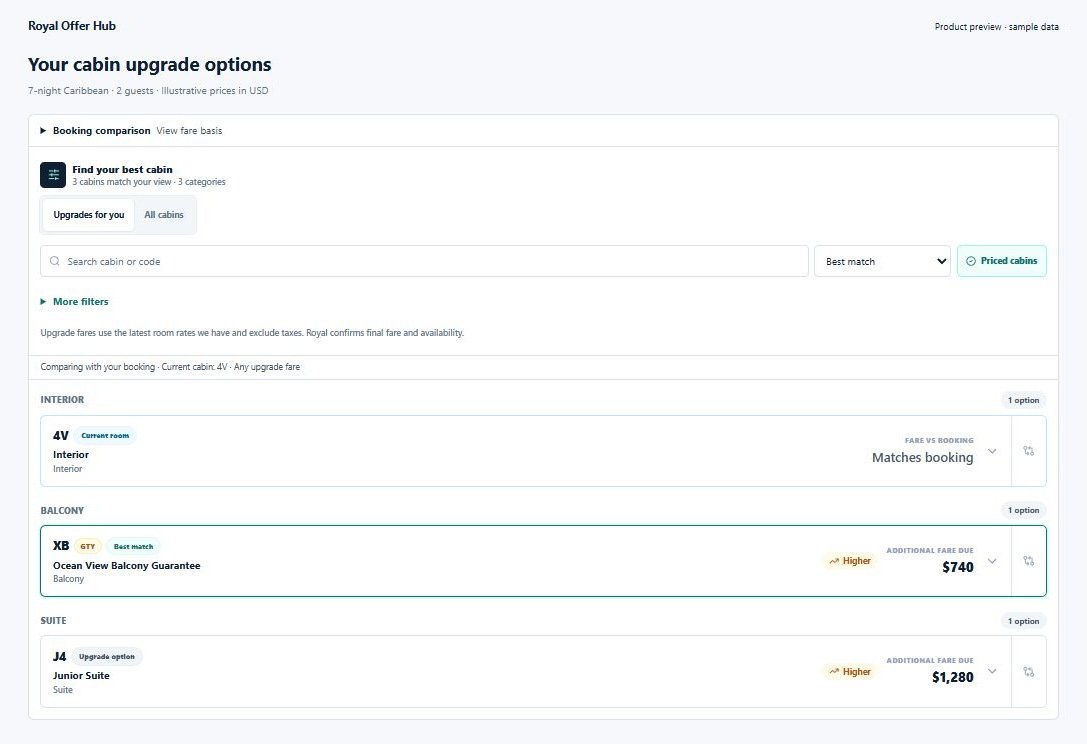
An upgrade comparison shows the estimated additional fare to move from your booked cabin to another category on the same sailing. Use your own cabin, guests and fare details, then confirm the actual amount and availability with your cruise line or travel advisor.
See the actual setupPut today’s upgrade estimate in context
See the estimated amount due to move from your booked cabin into an available category, alongside prices recorded for that sailing. Each category can change on its own.
Use the ship, sail date, booked cabin, and guest details for your reservation. These details affect which cabin prices and upgrade amounts apply.
The example uses illustrative US-dollar prices, not live quotes. Tracking is not a reservation, a RoyalUp bid, or a guarantee that an upgrade can be booked at the displayed amount.
7-night Caribbean · 2 guests
Estimated cost to move up
Booked: Interior · 4V
Booking credit: $2,000
Junior Suite
JS · Cabin fare $3,280
$320 lower than last check
Additional fare due
$1,280
Last check $1,600
Balcony guarantee
XB · Cabin fare $2,740
$110 lower than last check
Additional fare due
$740
Last check $850
Grand Suite
GS · Cabin fare $4,420
No change since last check
Additional fare due
$2,420
Last check $2,420
2 price drops across 3 watched categories
For both guests, before taxes and fees. Illustrative credit; confirm the final quote with your cruise line or advisor.
Why upgrade prices change
Available cabin inventory, demand for a sailing, and fare changes can all affect the prices you see. Cabin categories do not necessarily move together: a suite may become less expensive while another category stays the same.
Royal Offer Hub records observed prices; it does not know or predict Royal Caribbean’s pricing decisions. Compare the amount shown for an available cabin with your current cabin, then review how that difference has changed.
Why price history matters
The displayed amount shows the upgrade cost now. Comparing it with a recent price adds context, but neither number tells you what the next price will be.
Illustrative price movement
$900 → $400 $500 lower than the reference price
Cabin Price History and Upgrade Cost Comparison help you judge an available price against recorded observations. History depends on available data and your plan’s history window; it does not promise the lowest possible price.
Choose a price worth acting on
1. Add your sailing
Enter the ship, sailing date, and cabin you have booked. You can start with one watched sailing on the Free plan.
2. Watch cabin pricing over time
Royal Offer Hub checks prices at the cadence shown for your plan. Compare available categories and review recorded prices for the sailing.
3. Set the price you would consider
Choose the cabin and target upgrade price you would be ready to book. Receive relevant alerts when monitored conditions are met. Alert options depend on your plan: Free includes basic price alerts, while Cruiser adds email alerts and Captain includes priority alerts.
Monitoring by membership
- Free
- Daily price checks
- Cruiser
- Hourly price checks
- Captain
- Priority monitoring
Checks are periodic, not a continuous inventory hold. A price or cabin may change before you act on an alert.
Free upgrades can happen
Sometimes the estimated fare difference between cabin categories is small or $0. Treat that as a reason to check availability and your booking terms—not as a confirmed upgrade or a promise of no additional charges.
Your booking terms, cabin availability, and any applicable charges still matter. Confirm the actual amount due with Royal Caribbean, Club Royale, or your travel advisor before changing your reservation. Royal Caribbean’s room-change guidance explains who to contact.
Starting with a Club Royale offer? Search its eligible sailings, then track the trip you book. Browse the offer and upgrade guides. You can also track drinks, dining and shore excursions alongside your cabin with Cruiser or Captain.
Explore more cabin upgrade information
Review recent $0 price observations, compare ships, or learn how cabin changes differ from RoyalUp.
Free cabin upgrade opportunities
See recent $0 observationsUpgrade prices by ship
Compare ship dataCabin repricing vs. RoyalUp
Understand the difference